

3.3 File Status Panel
Last modified by publicadmin on 2025/12/16 13:04
Possible File Status Panel icons are as follows:
 | A blue spinning icon means that one or more files are currently in the process of being uploaded, being prepared for download, or processed. |
 | A green dot means that one or more files have been successfully uploaded, zipped for download, or processed. |
 | A red dot means that an error was encountered with one or more of your files. An error message will appear at the top of your screen if an error is encountered while downloading a file. |
Click on the File Status Panel Icon to view more information about files that are currently processing, files that were uploaded, downloaded, approved to be copied to the Core, and files moved to the Trash Bin.
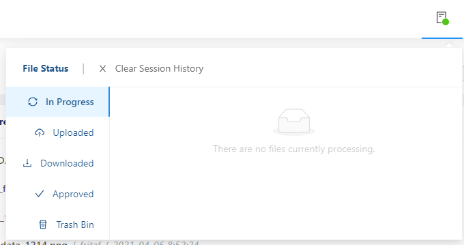
To view your download history from previous sessions, navigate to the Recent File Stream on your Project Landing Page and click on Advanced Search.
See Also:

Copyright © 2022, Indoc Research. This work is licensed under a Creative Commons Attribution-ShareAlike 4.0 International License.