

3.4 File Stream
The File Stream is a card on the Project Canvas that shows recent activity within a Project. The File Stream can be used to search a Project's activity logs by user, date, or action type. To search files by their attributes or metadata, see File Query.
Advanced Search
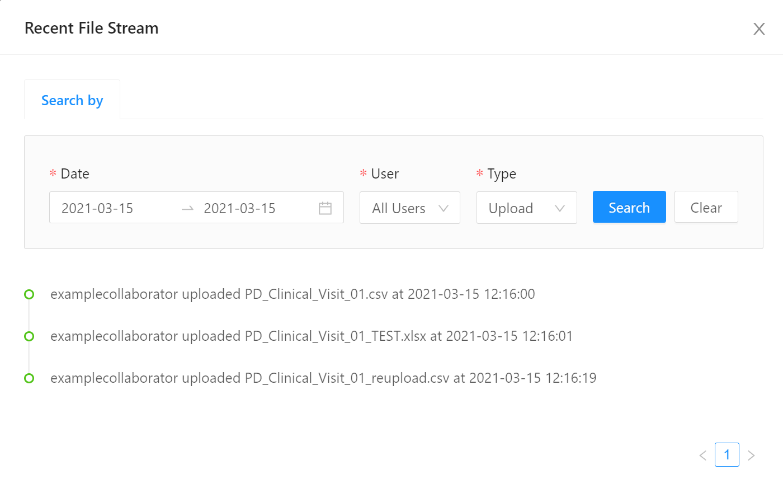
Search and view detailed file activity logs by clicking Advanced Search in the Recent File Stream card to open the File Stream Advanced Search.
Project Administrators can explore logs for the entire Project, whereas Project Collaborators and Contributors will only be able to search the files they have uploaded into the VRE Green Room, Project Administrators can see all files uploaded into their Projects. All users with access to the VRE Core will be able to see all files in the VRE Core.
To search for a file or file activity, follow the steps below:
- Navigate to your Project Landing Page
- Click Advanced Search in the File Stream card
- Select the Date range you would like to search by selecting start and end dates from the drop-down calendar
- Select a specific User to search or leave it set to All Users
- Filter the Log type by selecting Upload, Download, Copy, or Delete from the Type dropdown
- Click Search to view all Log entries that match your search criteria
- Click Clear to begin a new search
A list of file activities will be displayed showing the user that performed the action, the action type, the file name, and the date and time that the file action was performed.
See Also:

Copyright © 2022, Indoc Research. This work is licensed under a Creative Commons Attribution-ShareAlike 4.0 International License.