

7.2 Project Details and Settings
Last modified by publicadmin on 2025/12/16 13:04
The Project Settings can be accessed by Project Administrators by clicking the Settings icon  in the Left Toolbar.
Project Details
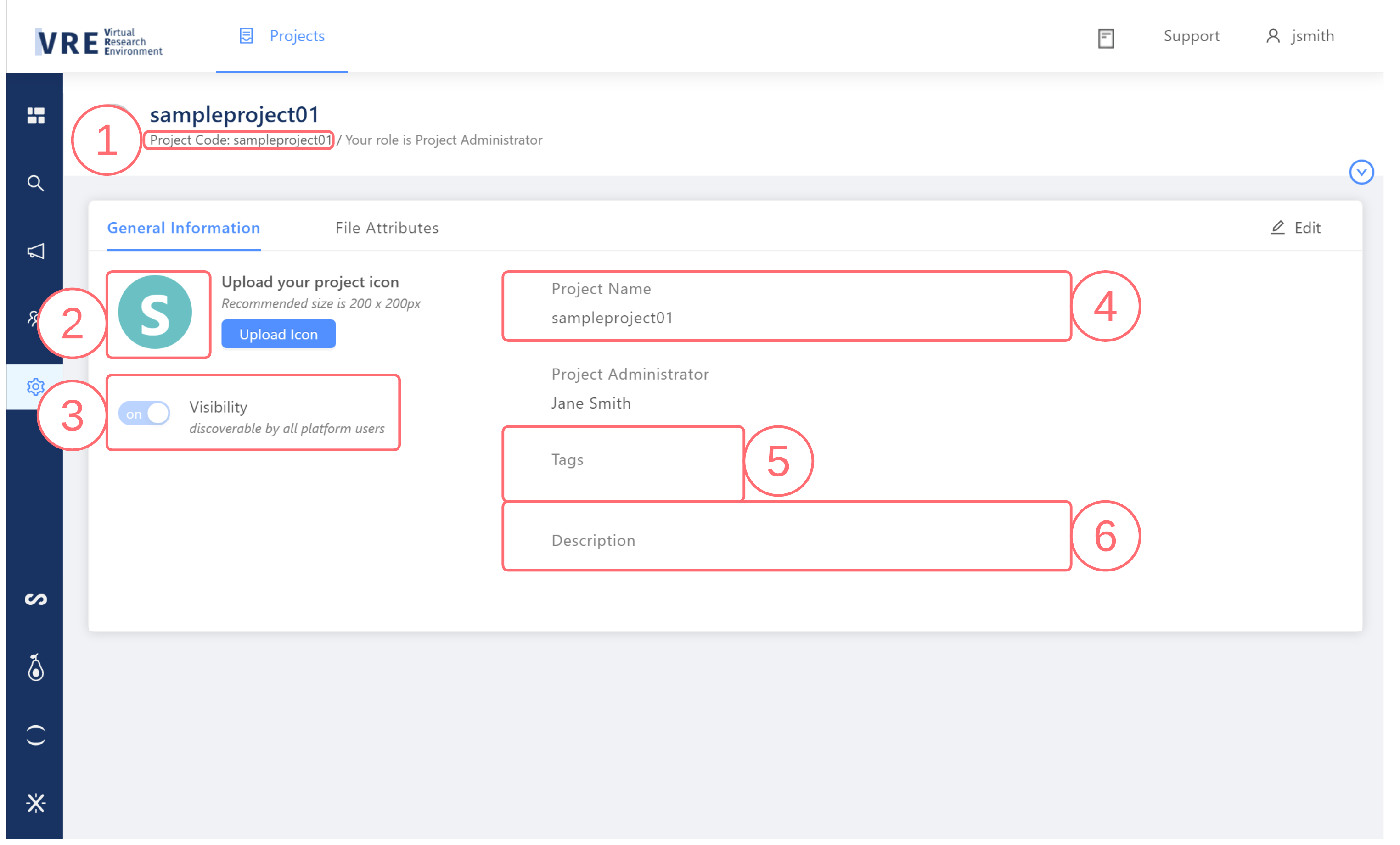
- Project Code (required)
- The Project Code is used by VRE backend services to uniquely identify the Project across the VRE. Project Code is mandatory for Project creation. Author a Project Code in conjunction with the Project Administrators.
- Once assigned, the Project Code cannot be changed. Project Codes must follow the naming convention: maximum 32 characters, consisting of any combination of lower-case letters (a-z) and numbers (0-9).
- The Project Code can be found in the Project Information header at the top of each Project page.
- Project Icon (optional)
- A small image (recommended 200 x 200 pixels) that can be used to help identify a Project.
- The icon appears in the Project Information header and beside the Project on the Landing page.
- The default icon is an image of the first letter of the Project Name and can be changed on the Project Settings page by a Project Administrator.
- Visibility (optional)
- This setting controls whether the basic Project information is discoverable by all platform users in the All Projects tab of the Landing Page.
- By default, visibility is set at "Make this project discoverable by all platform users”. Uncheck this box if the Project should be private and only be discoverable by Project Members. The Project Administrator can edit this setting later on the Settings page of their Project.
- Project Name (required)
- A short and user-friendly title assigned to the Project to make it easier for users to identify and locate the Project. Project Name is mandatory for Project creation and can later be changed by a Project Administrator.
- Tags (optional)
- Tags are keywords that can be assigned to help organize and find information in the VRE. Tags are optional and can later be added or changed by a Project Administrator.
- Description (optional)
- A longer, more informative Project field that can be used to add more context and inform users of study details. Description is optional for Project creation and can later be added or changed by a Project Administrator.
Editing Project Settings
Project information may be changed by Project Administrators. To edit your Project:
- Click the Settings icon in the Left Toolbar
- In the General Information tab, click the Edit button in the top right corner of the page
- Optional: You may upload a Project icon image file, recommended image size is 200 x 200 pixels
- Optional: You may edit your Project Name, set your Project Visibility to Discoverable or Hidden, add or remove tags, or edit your Project Description
- Once you have made all required changes, click Save Change to update your Project Details
Additional Project Settings
Project Administrators may also make modifications to File Attributes and User Rights. Platform Administrators can configure and grant access to Workbench Tools.
See also:

Copyright © 2022, Indoc Research. This work is licensed under a Creative Commons Attribution-ShareAlike 4.0 International License.