

Getting Help
Last modified by publicadmin on 2025/12/16 13:04
Support resources can be accessed from any page of the VRE Portal, regardless of whether you are logged into a Project.
- From the Main Menu, click Support, to open a sidebar with support resources.
- Access the User Guide using the link provided.
- Review Frequently asked questions to see if there is information already available on the issue that you are experiencing.
- If you cannot find a solution, scroll down to the Still need help? to initiate a support inquiry.
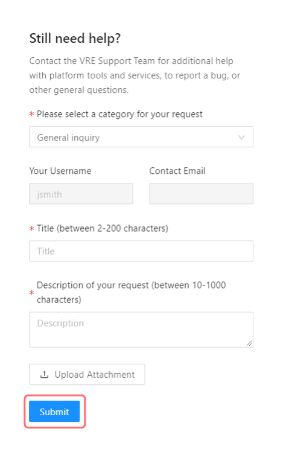
- Complete the required fields to provide details on your support inquiry and click Submit. A member of the VRE Support Team will connect with you to resolve your issue.
See Also:

Copyright © 2022, Indoc Research. This work is licensed under a Creative Commons Attribution-ShareAlike 4.0 International License.